
Fix a quiet recording and cut out long pauses
A lecture, voice memo or podcast is too quiet, and full of long silent gaps. How to bring it to a standard loudness and shorten the pauses automatically with KinoFlux Editor, with before and after numbers.
Nitiksh4 min readKinoFlux Editor
On this page
Recordings made on a phone or laptop are often too quiet. You turn the volume all the way up and still strain to hear. Lectures and interviews also have long silent stretches: thinking pauses, a slide change, someone walking to the board. Both make a recording harder to listen to.
KinoFlux Editor has two audio tools for this:
- Audio - Volume / normalize sets a file to a standard loudness, or changes its volume by a fixed amount.
- Audio - Remove silence shortens every long pause, or trims silence only at the start and end.
How to fix a quiet recording#
- Add the recording. Drag it onto the KinoFlux Editor window. Several files work too.
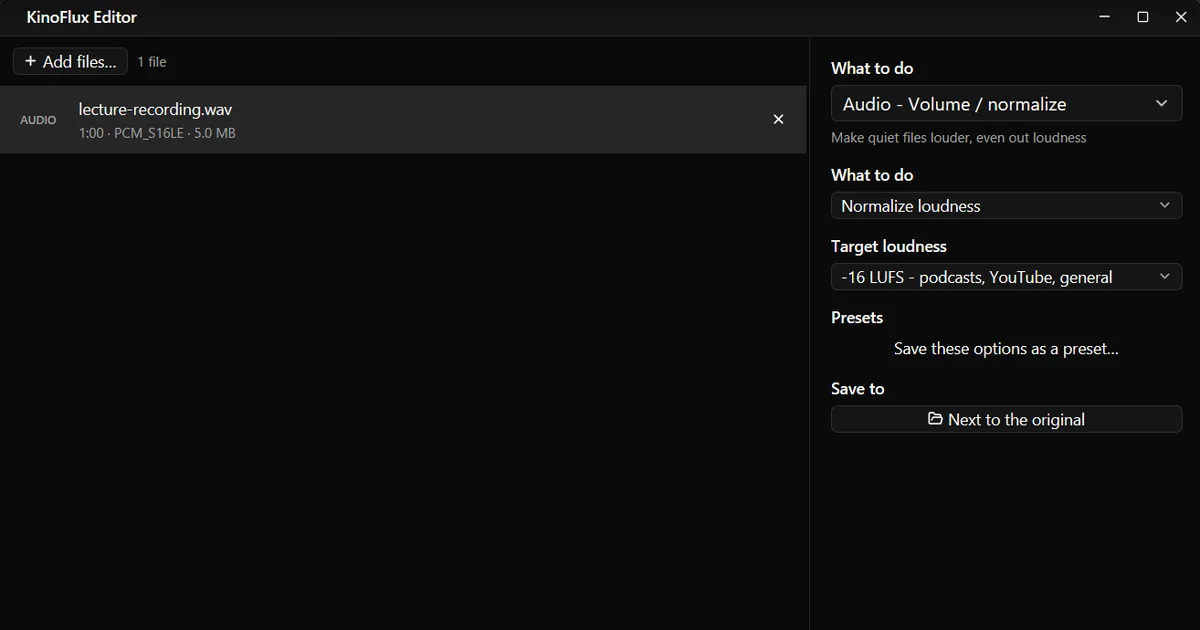
- Pick the tool. Press Ctrl+K (Cmd+K on a Mac), type "normalize" and choose Audio - Volume / normalize.
- Choose the target. -16 LUFS - podcasts, YouTube, general is the default and right for speech.
- Start. Press Ctrl+Enter. The result is saved as
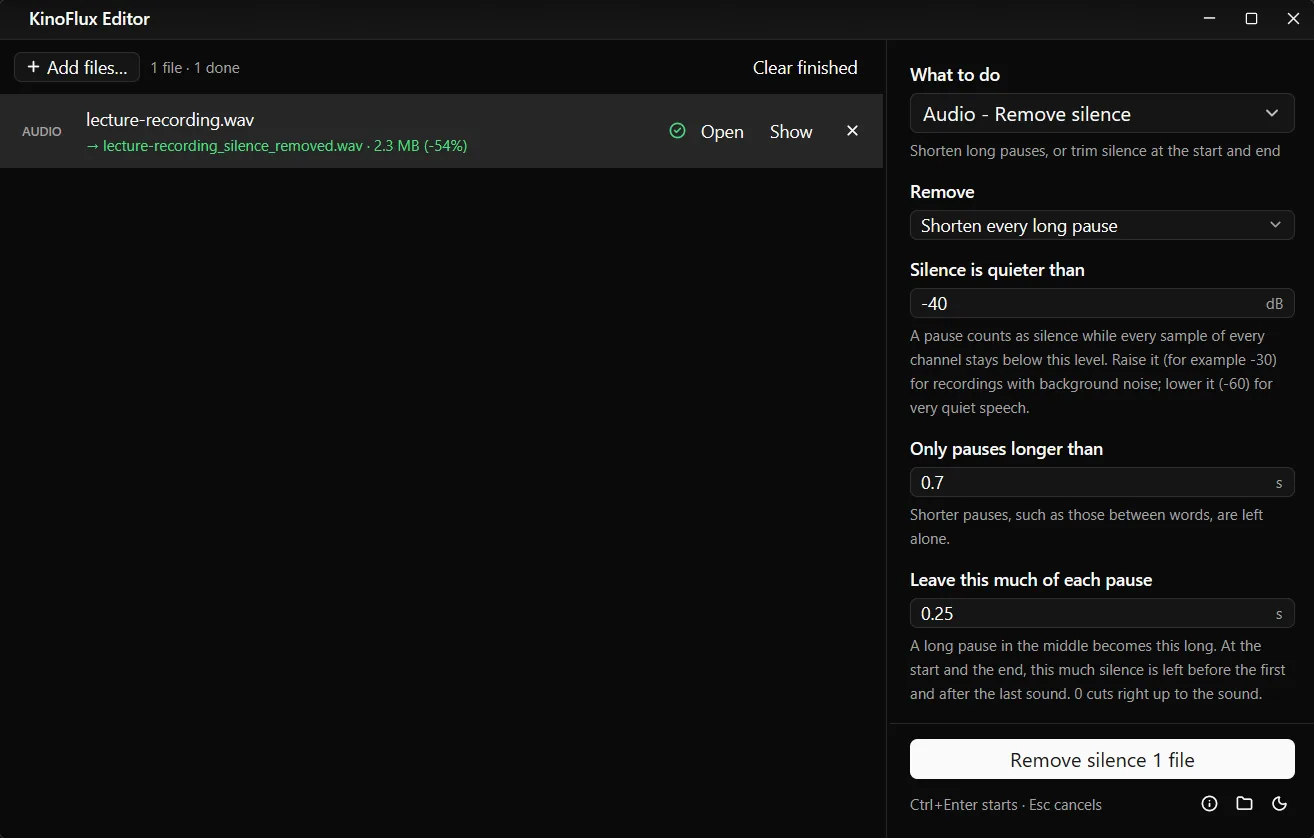
name_normalizednext to the original. - Remove the pauses. Add the normalized file, choose Audio - Remove silence, keep the defaults and press Ctrl+Enter again.

Before and after#
The test file is a 60 second mono demo WAV made for these guides: 2.5 second bursts of quiet sound with 3.5 second gaps, standing in for a quiet lecture recording.
| Step | Loudness | Peak | Length |
|---|---|---|---|
| Original | -35.8 LUFS | -28.0 dBFS | 60.0 s |
| After Normalize (-16 LUFS) | -15.9 LUFS | -7.6 dBFS | 60.0 s |
| After Remove silence (defaults) on the original | unchanged | unchanged | 27.5 s |
Normalize raised the level by about 20 dB and landed 0.1 dB from the target. Remove silence cut the file to less than half its length by shortening each long gap to a quarter of a second.
Volume / normalize options#
| Option | Choices | Default |
|---|---|---|
| What to do | Normalize loudness, or Change volume (dB) | Normalize loudness |
| Target loudness | -16 LUFS (podcasts, YouTube, general), -14 LUFS (Spotify, streaming), -23 LUFS (broadcast, EBU R128) | -16 LUFS |
| Volume change | -30 to +30 dB | +6 dB |
Normalize also keeps the peaks below -1.5 dB so the louder file does not clip. When you raise the volume by a fixed amount, a limiter stops the loudest moments from distorting.
Remove silence options#
| Option | Choices | Default |
|---|---|---|
| Remove | Shorten every long pause, Only at the start and the end, Only at the start, Only at the end | Shorten every long pause |
| Silence is quieter than | -90 to -10 dB | -40 dB |
| Only pauses longer than | 0.1 to 30 seconds | 0.7 s |
| Leave this much of each pause | 0 to 5 seconds | 0.25 s |
| Save as | Same as the original, or any of the twelve audio formats | Same as the original |
Tips for the settings:
- Recording with hiss or room noise: raise the level to -30 dB.
- Very quiet speech: lower it to -60 dB so soft words are not taken for silence.
- Sounds rushed after cutting: leave more of each pause, for example 0.5 seconds.
- Only want to tidy a voice memo: choose Only at the start and the end.
Limits#
- It does not remove noise. Hiss, hum and traffic stay. These tools change loudness and length, not the sound itself.
- Normalize works on the whole file. It does not level out a quiet speaker and a loud one in the same recording.
- Silence detection is a simple level check. Music with quiet passages can lose them. Use it for speech.
- Both tools encode the audio again. Compressed formats lose a little quality each time. If you run both, consider saving the first step as WAV or FLAC.
Related guides#
- Want it shorter still? Speed it up to 1.25x or 1.5x after removing the pauses.
- Cut the start and end by hand: trim, join and fade audio.
- Make a smaller file for sharing: convert to MP3 at 128 kbps.
All tools are on the KinoFlux Editor page.
Frequently asked questions
What is LUFS and which target should I pick?
LUFS measures how loud audio sounds to people, not just its peaks. -16 LUFS is a good level for podcasts, YouTube and general listening. -14 LUFS matches music streaming services. -23 LUFS is the European broadcast standard.
What is the difference between Normalize and Change volume?
Normalize measures the file and sets it to a target loudness, so different files end up equally loud. Change volume adds or removes a fixed number of decibels: +6 dB is about twice as loud, -6 dB about half.
Will Remove silence cut the pauses between words?
No. By default only pauses longer than 0.7 seconds count, and each one is shortened to 0.25 seconds, not removed completely. Short pauses between words are left alone.
My recording has background noise. Will silence removal still work?
Raise the Silence is quieter than level, for example from -40 to -30 dB, so the hiss counts as silence. If the noise is loud, the pauses may not be detected at all.
Does it work on the sound of a video?
These are audio tools. Extract the sound first with Video - Extract audio, or fix the audio file and put it back with Video - Replace / mix audio.
- normalize audio
- loudness
- remove silence
- podcast